Home
Contact Centres Hosted Contact Centre Predictive Dialler CRM Integration Reporting Live TPS Checking
Voice SIP Trunking VoIP Hosted PBX Hosted Asterisk
Data Connectivity AI Solutions
About About Blue Telecoms Accreditations Reviews Blog Support
Get in Touch
Omnichannel

WhatsApp — Business Messaging Inside Your Contact Centre

WhatsApp Business integration built directly into the agent interface. Your customers message you on the world's most popular messaging app — your agents respond from the same screen they handle calls.

Request a Demo ← Back to Contact Centre
WhatsApp Business contact centre integration, WhatsApp customer service, omnichannel WhatsApp messaging
Feature

WhatsApp Business — meet customers where they already are

Over 2 billion people use WhatsApp worldwide. Your customers already have it on their phones. With Blue Telecoms, you can handle WhatsApp conversations alongside voice calls, emails, and every other channel — from a single agent desktop.

💬

Two-Way Messaging

Customers send you a WhatsApp message; agents see it instantly in their interface and respond in real time. Full two-way conversations with text, images, documents, and links — all logged against the contact record.

Benefit: Engage customers on their preferred channel without adding complexity for your agents.

📋

Template Messages

Send pre-approved WhatsApp Business template messages for appointment confirmations, delivery updates, payment reminders, and marketing follow-ups. Triggered automatically by call outcomes or sent manually.

Benefit: Consistent, compliant messaging that reaches customers on the app they check most.

🔀

Intelligent Routing

Incoming WhatsApp messages are routed to the right agent or team based on skills, availability, and queue rules — the same routing engine that handles your voice calls.

Benefit: No messages get lost. Every conversation reaches the right person, fast.

📊

Full Audit Trail

Every WhatsApp conversation is logged, timestamped, and linked to the customer record. Managers can review message history, agent response times, and conversation outcomes.

Benefit: Complete visibility for compliance, quality assurance, and performance management.

Action

How WhatsApp works on the platform

WhatsApp conversations appear alongside calls and other channels in the unified agent desktop. Here's what that looks like in practice:

  • Inline conversations — WhatsApp messages appear in the agent's active queue alongside calls, emails, and chats.
  • Rich media support — Send and receive images, PDFs, voice notes, and location pins directly from the agent interface.
  • Quick replies — Pre-built response templates let agents handle common queries with a single click.
  • Contact matching — The platform automatically matches incoming WhatsApp numbers to existing contact records.
  • Multi-conversation handling — Agents can manage multiple WhatsApp conversations simultaneously, just like web chat.
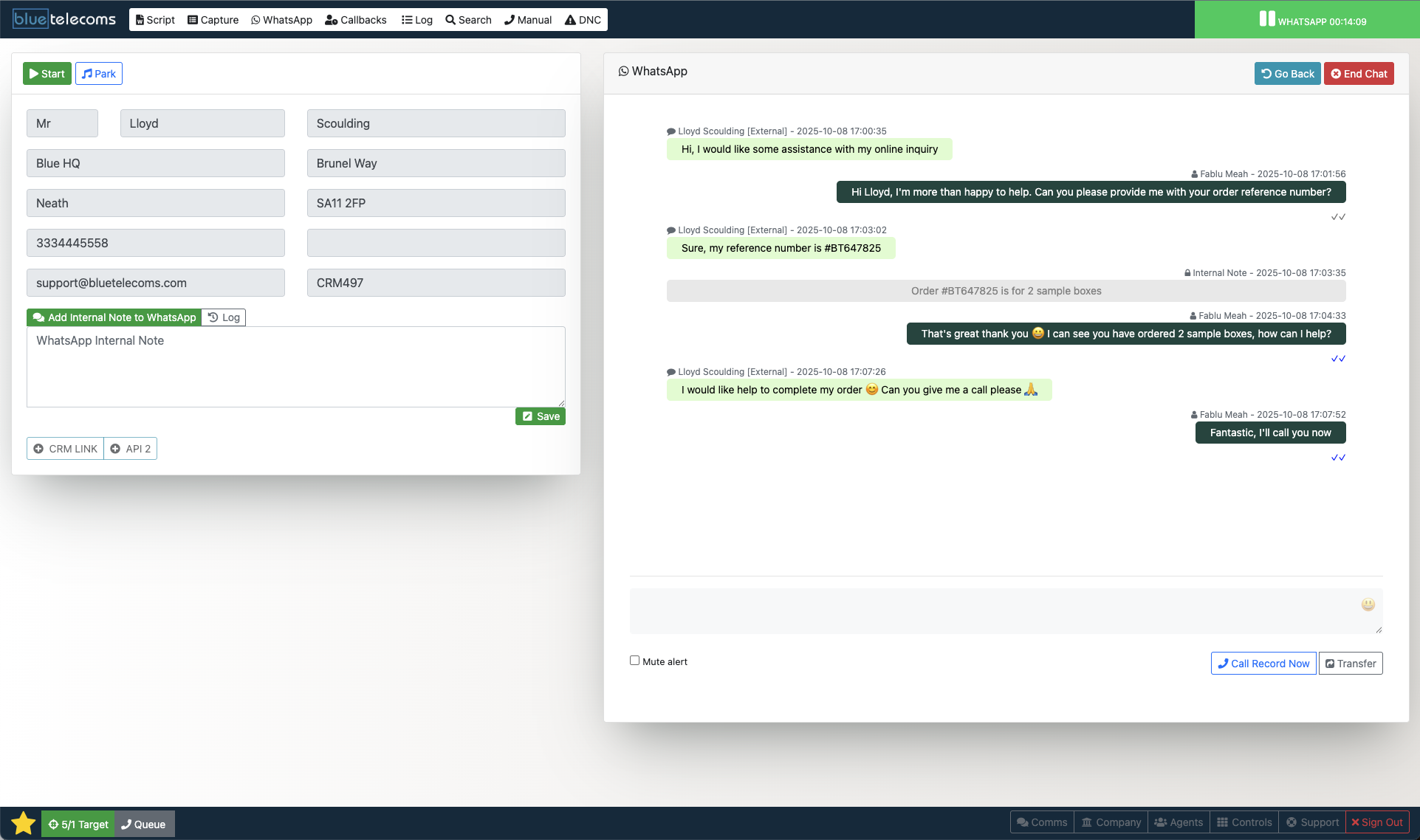
Blue Telecoms platform showing WhatsApp Business integration in the agent interface
Benefit

WhatsApp inside the unified agent desktop

Your agents don't need WhatsApp Web, a separate phone, or a third-party app. WhatsApp conversations live inside the same platform where they handle calls, emails, web chats, and social media messages.

That means one login, one interface, one view of the customer. Full interaction history across every channel, so agents always have the context they need — whether the customer called last week or messaged on WhatsApp five minutes ago.

🖥️

One Desktop. Every Channel.

Complete customer engagement.

Ready to add WhatsApp to your contact centre?

Request a personalised demo and see how WhatsApp Business integrates seamlessly into your agent desktop alongside voice, email, and every other channel.

Request a Demo Explore Web Chat →